
How I made a Rails weather app feel like a SPA
I wanted Forecastly to feel fast before it was fast.
That sounds wrong, but it isn’t.
When someone searches for a city, they’re waiting on geocoding, Weather.gov, and whatever the network feels like doing that day. I can cache a lot of that, but I still have to deal with the moment between “Search” and “Here’s your forecast.”
That’s where the app either feels smooth or feels cheap.
I didn’t want to build a React app to solve that. I wanted Rails to do the job.
The page loads useful content without pretending to be static
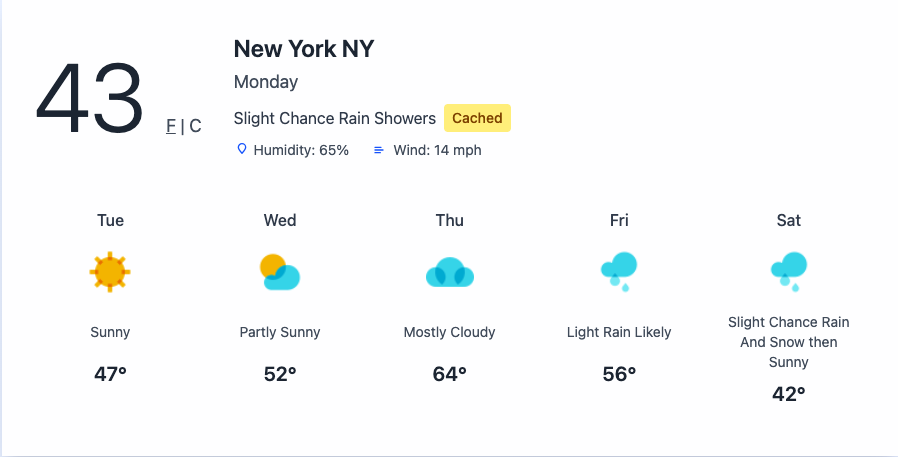
The landing page renders a turbo_frame_tag with a src attribute:
<%= turbo_frame_tag "forecast",
      src: weather_search_path(address: "New York NY"),
      data: { "loading-target": "forecast" } do %>
  <div class="text-center text-gray-600 py-12 italic text-lg font-semibold">
    Enter a city in US to get the current weather and forecast!
  </div>
<% end %>
That’s in index.html.erb around the lazy-loaded forecast frame.
This is one of my favorite parts of the app.
The page gets server-rendered immediately. The forecast section is still dynamic. Turbo lazily requests a default New York forecast after the page arrives. So the user doesn’t land on an empty shell, and I don’t have to cram the whole home page response behind a slow weather lookup.
That one choice makes the app feel lighter.
Search updates only the forecast area
The form targets the same frame:
<%= form_with url: weather_search_path,
      method: :get,
      data: { turbo_frame: "forecast", controller: "address-typeahead" } do |f| %>
Also in index.html.erb, this time on the search form.
That means a search request doesn’t replace the whole page. It replaces one region. Header stays put. Layout stays put. The page doesn’t blink. It just swaps forecast content.
That’s the part people often describe as “SPA-like,” and honestly I think Turbo is enough for this class of app.
If the interaction is “submit a form, replace a section, keep the shell,” Rails already has a good answer.
The response is a real partial page, not JSON dressed up as architecture
The search action renders search.html.erb, which returns the frame content directly:
<%= turbo_frame_tag "forecast" do %>
  <% if @current_forecast %>
    <section class="max-w-4xl mx-auto shadow-xl border-0 bg-white/95 backdrop-blur-sm"
         data-controller="temperature">
      <div class="p-8">
        <%= render ForecastCurrentComponent.new(city: @city, current: @current_forecast, from_cache: @from_cache) %>
        <%= render ForecastDailyComponent.new(days: @daily_forecast) %>
      </div>
    </section>
  <% elsif @error %>
    <div class="text-center text-gray-600 py-12 italic text-lg font-semibold">
      <%= @error %>
    </div>
  <% end %>
<% end %>
No client-side state machine. No JSON endpoint plus rendering layer plus frontend cache plus loading state library. The server returns HTML for the exact region that needs to change.
I still think this is an underrated way to build product UI.
I added a loading state where it actually matters
The app uses a small Stimulus controller to swap in a spinner before the Turbo request goes out:
connect() {
  document.addEventListener("turbo:before-fetch-request", this.show.bind(this))
}

show() {
  this.forecastTarget.innerHTML = this.spinnerTarget.innerHTML
}
That’s in loading_controller.js.
The page already includes a hidden <template> for the spinner. On any Turbo fetch, that markup gets dropped into the forecast area. So instead of watching the old content sit there awkwardly while a request is in flight, the user gets an immediate visual response.
That changes the feel of the app more than most backend optimizations.
You can have a fast server and still build a UI that feels laggy if it doesn’t react right away.
Typeahead helps before the request even starts
There’s another small Stimulus controller on the search field:
query() {
  clearTimeout(this.timer)
  this.timer = setTimeout(() => this.fetchSuggestions(), this.delayValue)
}

async fetchSuggestions() {
  const q = this.inputTarget.value.trim()
  if (q.length < 3) return
  const url = `https://nominatim.openstreetmap.org/search?format=json&limit=5&countrycodes=us&q=${encodeURIComponent(q)}`
That’s in address_typeahead_controller.js.
This does two things I care about:
- it debounces input, so it doesn’t hammer the API
- it narrows suggestions to US locations, which matches the product
It’s also a good example of how far you can get with tiny browser-side enhancements. The form is still a plain form. The backend still decides what the real result is. The typeahead just makes it easier to submit a better address.
Caching helps the UI feel smarter
The search action caches successful results for thirty minutes and sets @from_cache when a hit comes back:
cached_result = Rails.cache.read(cache_key)
@from_cache = false

if cached_result
  result = cached_result
  @from_cache = true
else
  result = WeatherFetcher.new(address).call
  Rails.cache.write(cache_key, result, expires_in: 30.minutes) unless result[:error]
end
That’s in weather_controller.rb.
The current forecast component even shows a small “Cached” pill when the result came out of storage, which is a nice detail in forecast_current_component.html.erb.
So the app isn’t just faster on repeated searches. It tells the truth about why it’s faster.
Why I didn’t reach for a frontend framework
This app has:
- partial page updates
- lazy loading
- loading states
- interactive unit toggles
- typeahead suggestions
That’s already a decent amount of interactivity.
And it still doesn’t need a client-side router, a server-state library, or a component tree living in the browser. The biggest interactions in Forecastly are still request-response interactions. Turbo Frames are built for that.
A lot of frontend complexity comes from solving the wrong problem. If your app mostly asks the server for new HTML, let the server send HTML.
The test I care about
There’s a request spec asserting that the page includes the lazy-loaded Turbo Frame for the default New York forecast:
expect(response.body).to include('turbo-frame data-loading-target="forecast" id="forecast" src="/weather/search?address=New+York+NY"')That lives in weather_controller_spec.rb.
I like this test because it locks in behavior that users actually notice. Not an implementation detail. Not a private helper. The page should boot with a lazy-loaded forecast frame. If that disappears, the experience changes.
That’s worth pinning down.
The bigger point
I think people sometimes talk about Turbo as if it’s only a halfway measure before “real” frontend architecture.
I don’t buy that.
For apps like Forecastly, Turbo is the architecture. The job is to make searches feel quick, keep the page stable, and swap in fresh content without ceremony. It does that well.
The app feels smooth because the server, Turbo, and a couple of tiny Stimulus controllers each do one small job.
That’s enough.
The full source for this project is on GitHub: github.com/dmitryjum/forecastly
Have you built anything lately where the server-rendered version ended up being the better frontend?